
 DZ(USD)
 AO(USD)
 BJ(USD)
 BW(USD)
 BF(USD)
 BI(USD)
 CM(USD)
 CV(USD)
 CF(USD)
 TD(USD)
 KM(USD)
 CG(USD)
 CI(USD)
 DJ(USD)
 EG(USD)
 GQ(USD)
 ER(USD)
 ET(USD)
 GA(USD)
 GM(USD)
 GH(USD)
 GN(USD)
 GW(USD)
 KE(USD)
 LS(USD)
 LR(USD)
 LY(USD)
 MG(USD)
 MW(USD)
 ML(USD)
 MR(USD)
 MU(USD)
 YT(USD)
 MA(USD)
 MZ(USD)
 NA(USD)
 NE(USD)
 NG(USD)
 RE(USD)
 RW(USD)
 SN(USD)
 SC(USD)
 SL(USD)
 SO(USD)
 ZA(USD)
 SS(USD)
 SH(USD)
 SD(USD)
 SZ(USD)
 TZ(USD)
 TG(USD)
 TN(USD)
 UG(USD)
 EH(USD)
 ZM(USD)
 ZW(USD)
 AQ(USD)
 BV(USD)
 AF(USD)
 AM(USD)
 AZ(USD)
 BH(USD)
 BD(USD)
 BT(USD)
 IO(USD)
 BN(USD)
 KH(USD)
 CN(USD)
 CX(USD)
 TL(USD)
 GE(USD)
 HK(USD)
 IN(USD)
 ID(USD)
 IR(USD)
 IQ(USD)
 IL(USD)
 JP(USD)
 JO(USD)
 KZ(USD)
 KW(USD)
 KG(USD)
 LA(USD)
 LB(USD)
 MO(USD)
 MY(USD)
 MV(USD)
 MN(USD)
 MM(USD)
 NP(USD)
 KP(USD)
 OM(USD)
 PK(USD)
 PS(USD)
 PH(USD)
 QA(USD)
 SA(USD)
 SG(USD)
 KR(USD)
 LK(USD)
 SY(USD)
 TW(USD)
 TJ(USD)
 TH(USD)
 TR(USD)
 TM(USD)
 AE(USD)
 UZ(USD)
 VN(USD)
 YE(USD)
 AL(USD)
 AD(USD)
 AT(USD)
 BY(USD)
 BE(USD)
 BA(USD)
 BG(USD)
 HR(USD)
 CY(USD)
 CZ(USD)
 DK(USD)
 EE(USD)
 FO(USD)
 FI(USD)
 FR(USD)
 DE(USD)
 GI(USD)
 GR(USD)
 HU(USD)
 IS(USD)
 IE(USD)
 IT(USD)
 JE(USD)
 LV(USD)
 LI(USD)
 LT(USD)
 LU(USD)
 MT(USD)
 MC(USD)
 ME(USD)
 NL(USD)
 MK(USD)
 NO(USD)
 PL(USD)
 PT(USD)
 MD(USD)
 RO(USD)
 RU(USD)
 SM(USD)
 RS(USD)
 SK(USD)
 SI(USD)
 ES(USD)
 SE(USD)
 CH(USD)
 UA(USD)
 GB(USD)
 VA(USD)
 AI(USD)
 AG(USD)
 AW(USD)
 BS(USD)
 BB(USD)
 BZ(USD)
 BM(USD)
 CA(USD)
 KY(USD)
 CR(USD)
 CU(USD)
 DO(USD)
 SV(USD)
 GL(USD)
 GD(USD)
 GP(USD)
 GT(USD)
 HT(USD)
 HN(USD)
 JM(USD)
 MQ(USD)
 MX(USD)
 MS(USD)
 NI(USD)
 PA(USD)
 PR(USD)
 KN(USD)
 LC(USD)
 VC(USD)
 TT(USD)
 TC(USD)
 VI(USD)
 AS(USD)
 AU(USD)
 CC(USD)
 CK(USD)
 FJ(USD)
 PF(USD)
 GU(USD)
 KI(USD)
 MH(USD)
 FM(USD)
 NR(USD)
 NC(USD)
 NZ(USD)
 NU(USD)
 NF(USD)
 MP(USD)
 PW(USD)
 PG(USD)
 PN(USD)
 WS(USD)
 SB(USD)
 TK(USD)
 TO(USD)
 TV(USD)
 VU(USD)
 WF(USD)
 AR(USD)
 BO(USD)
 BR(USD)
 CL(USD)
 CO(USD)
 EC(USD)
 FK(USD)
 GF(USD)
 GY(USD)
 PY(USD)
 PE(USD)
 SR(USD)
 UY(USD)
 VE(USD)
Blog
Ultimate Gaming Workstation Setup Ideas for Maximum Comfort
- Feb.28, 2026 08:23:28
- 0 Comments
The ultimate gaming workstation setup is all about creating a space that maximizes both comfort and performance. EASE COMFY TECHNOLOGY CO.,LTD (EASE COMFY) sets the benchmark with ergonomic innovations and smart design. Start with a premium ergonomic gaming chair and a height adjustable desk to support healthy posture and flexibility. Integrate RGB lighting for mood, a monitor arm for optimal viewing angles, and a cable management system to keep your space organized. Add comfort boosters such as an anti-fatigue mat, adjustable keyboard tray, gaming footrest, and memory foam wrist rest. For unmatched immersion, consider a soundproof gaming booth to block external distractions. Layout and personalization are crucial—position your desk well, adjust your chair and peripherals, and use modular accessories to future-proof your setup. With these ten essential product ideas from EASE COMFY, your gaming workstation will deliver maximum comfort, style, and performance—keeping you at your best for every game and work session.
Introduction to the Ultimate Gaming Workstation Setup
The dream of every gamer is to have an ultimate gaming workstation setup that not only enhances their performance but delivers maximum comfort for those extended gaming marathons. EASE COMFY TECHNOLOGY CO.,LTD, widely known as EASE COMFY, is at the forefront of transforming gaming environments with innovative ergonomic solutions. In this comprehensive guide, we will explore top workstation ideas, integrating key product keywords like ergonomic gaming chair, height adjustable desk, RGB lighting, monitor arm, cable management system, anti-fatigue mat, adjustable keyboard tray, gaming footrest, memory foam wrist rest, and soundproof gaming booth—ensuring your gaming station is as comfortable as it is high-performance.
Ergonomic Gaming Chair: The Foundation of Comfort
An ergonomic gaming chair is the backbone of any high-quality gaming workstation. EASE COMFY offers chairs that boast multi-directional lumbar support, adjustable armrests, and breathable materials. These features are crucial for maintaining a healthy posture and preventing fatigue during long gaming sessions. Investing in a premium ergonomic gaming chair from EASE COMFY means you can focus on the game, not on discomfort.
undefined
Height Adjustable Desk for Seamless Flexibility
Next up in the ultimate gaming workstation setup ideas is a height adjustable desk. EASE COMFY TECHNOLOGY CO.,LTD provides motorized desks that let you switch between sitting and standing positions effortlessly. This flexibility increases circulation, reduces the risk of repetitive strain injuries, and keeps you alert, making it perfect for both gaming and productivity.
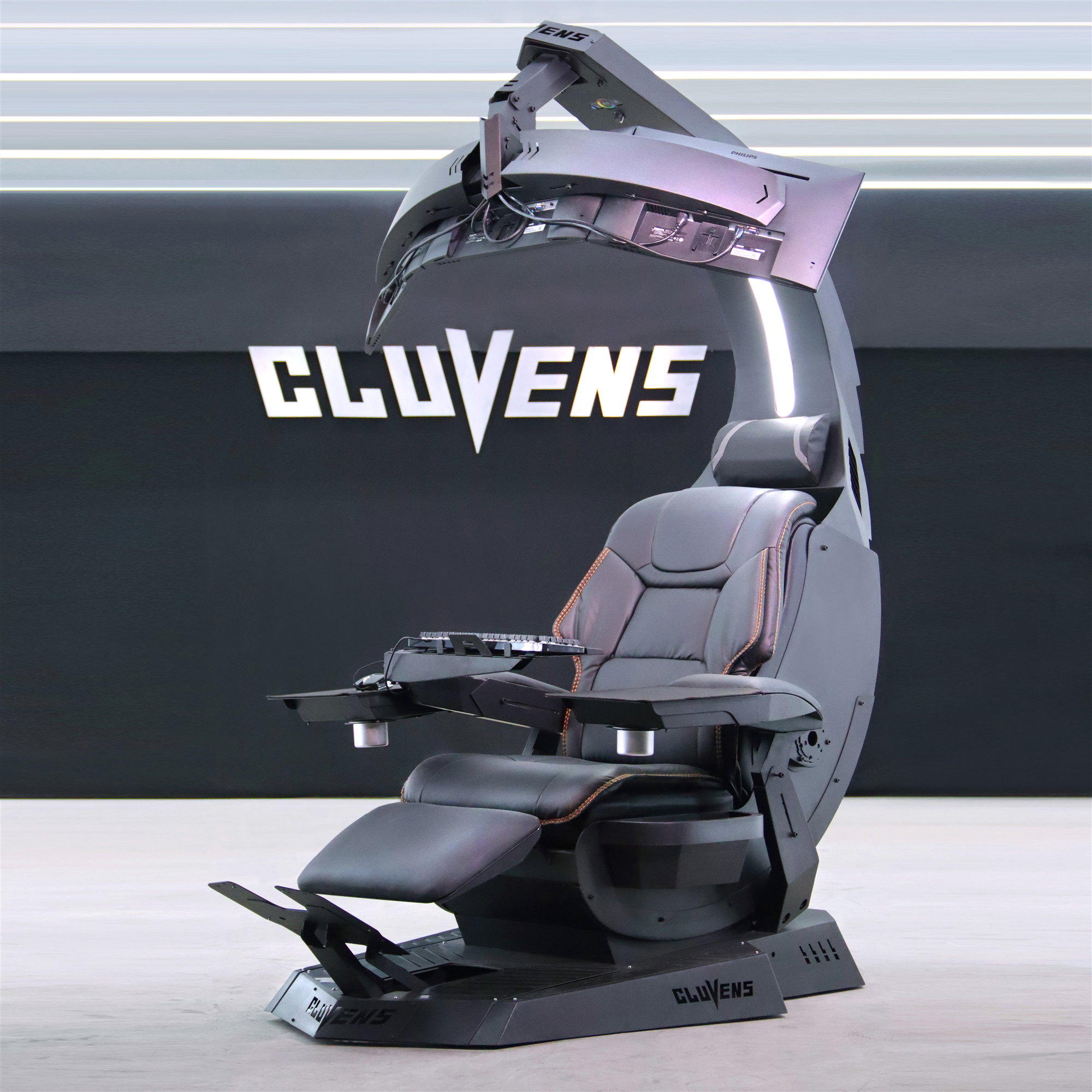
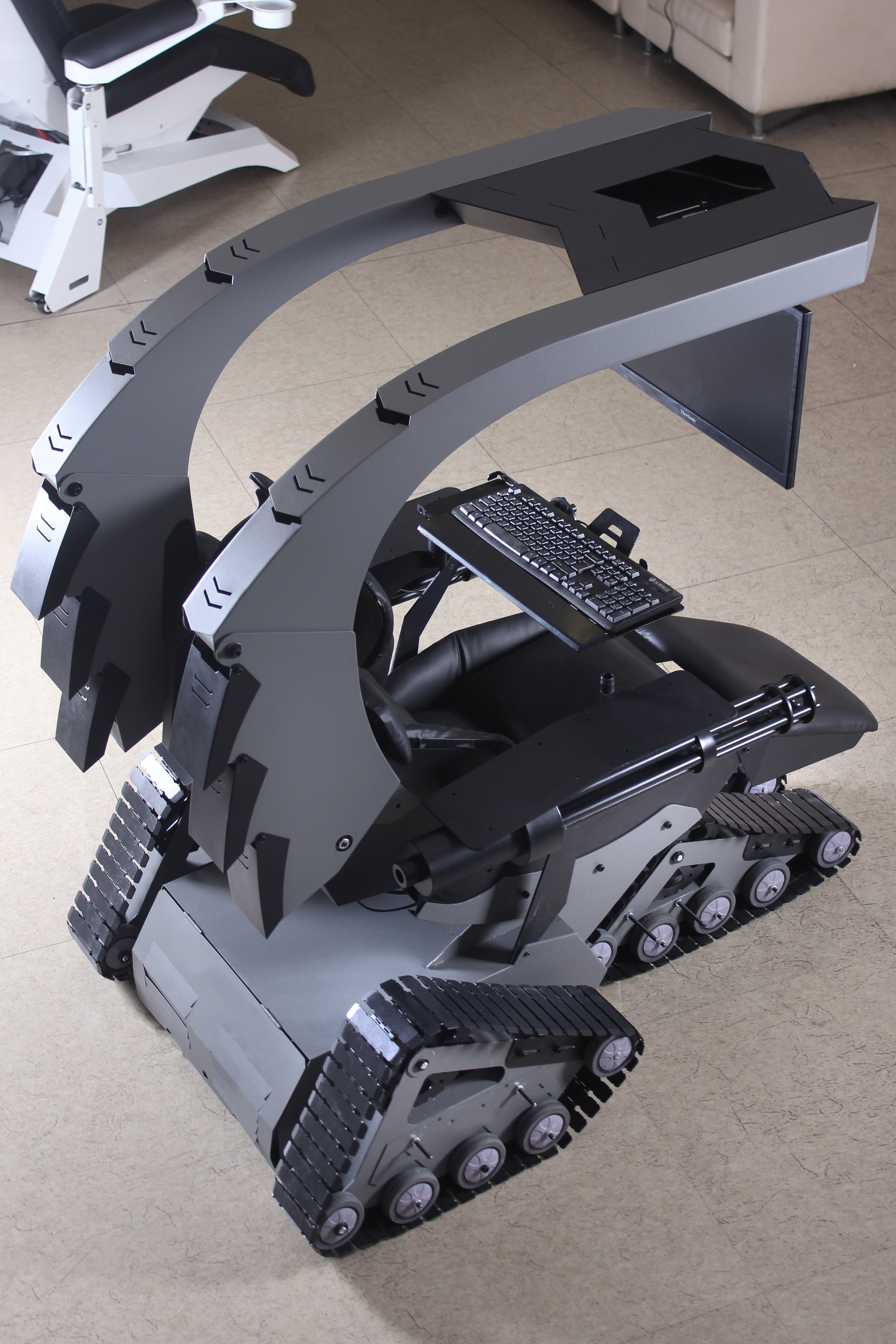
Cluvens SK Scorpion chair cockpit
Cluvens M2HB.50 BMG computer workstation chair
Cluvens Manticore - bigger & wider recline workstation
J20 Gatling Battle Station Ultimate cockpit
Enhance Your Atmosphere with RGB Lighting
Lighting plays a huge role in boosting the immersive feel of your gaming zone. EASE COMFY’s RGB lighting strips and desk lamps allow you to customize your setup’s color ambiance, providing not only aesthetics but also eye comfort. Synchronize your lights with your gameplay for an enhanced experience that brings your games to life.
Monitor Arm for Optimal Viewing Angles
Screen positioning is vital to reduce neck and eye strain. A monitor arm from EASE COMFY allows you to adjust your monitor’s height, tilt, and rotation for the most ergonomic viewing angle. This ensures you can maintain good posture, minimize glare, and maximize desk space for other essential peripherals.
Cable Management System for a Clean Setup
Nothing disrupts a sleek gaming environment like tangled wires. The cable management system solutions from EASE COMFY help you keep all your cables organized, hidden, and easy to access. Use under-desk trays, cable sleeves, and clips to maintain a clutter-free and aesthetically pleasing gaming workstation.
Stay Energized with an Anti-Fatigue Mat
Standing desks are best paired with an anti-fatigue mat. EASE COMFY’s mats are constructed from premium-grade materials, providing superior cushioning and support. They help reduce joint stress and fatigue, so you can stand longer and stay comfortable even during intense gaming or work sessions.
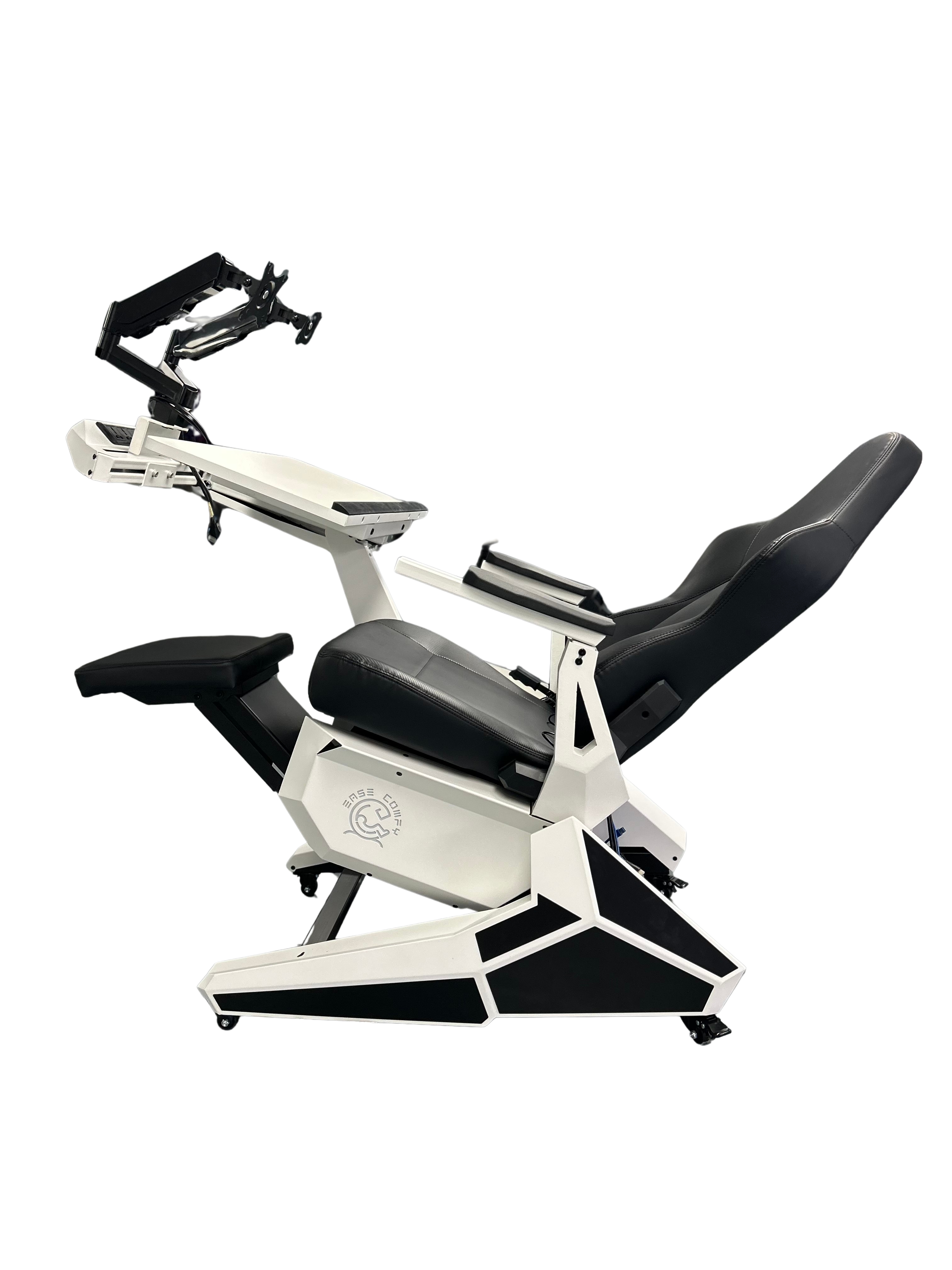
Adjustable Keyboard Tray for Comfortable Typing
The adjustable keyboard tray by EASE COMFY is engineered to put your wrists and hands in a neutral position, preventing repetitive strain injuries. It’s easy to position for typing or gaming, allowing you to maintain optimal wrist alignment and comfort no matter how long you play.
Gaming Footrest: Support Your Lower Body
Don’t overlook your legs and feet in your pursuit of maximum comfort. The EASE COMFY gaming footrest supports your feet, improves circulation, and relieves lower back pressure. Choose from adjustable or memory foam models tailored to fit under any desk in your gaming setup for constant support.
Memory Foam Wrist Rest for Extended Comfort
Wrist fatigue can break your focus and enjoyment. EASE COMFY’s memory foam wrist rest is a small but critical accessory that alleviates pressure during long gaming or typing sessions, ensuring your hands remain comfortable and responsive at all times.
Soundproof Gaming Booth: Isolation for Focus
For the ultimate immersive experience, consider a soundproof gaming booth by EASE COMFY TECHNOLOGY CO.,LTD. These booths are designed to isolate you from external noise, making them perfect for streamers, esports competitors, and gamers who want to stay focused during crucial moments.
Integrated Ultimate Gaming Workstation Setup Checklist
| Product Keyword | Description | EASE COMFY Solution |
|---|---|---|
| Ergonomic Gaming Chair | Essential for back and neck support | Multi-adjustable design |
| Height Adjustable Desk | Switch between sitting and standing | Motorized controls |
| RGB Lighting | Personalized ambiance | Customizable LED systems |
| Monitor Arm | Adjustable screen height and tilt | Full motion arms |
| Cable Management System | Organized wires and peripherals | Desk trays, clips, sleeves |
| Anti-Fatigue Mat | Cushioned standing support | Premium foam construction |
| Adjustable Keyboard Tray | Ergonomic wrist position | Slide-out, adjustable trays |
| Gaming Footrest | Foot support and circulation | Adjustable, memory foam models |
| Memory Foam Wrist Rest | Wrist pressure relief | High-density foam pads |
| Soundproof Gaming Booth | Noise isolation for focus | Portable, modular booths |
Layout and Design Tips for Your Gaming Workstation
- Desk Placement: Position your height adjustable desk near natural light but avoid direct screen glare.
- Chair Adjustments: Set your ergonomic gaming chair’s lumbar and headrest supports to match your body’s needs.
- Lighting Strategy: Use RGB lighting for mood, but add a desk lamp for focused tasks.
- Cable Routing: Install a cable management system to route wires along the desk’s edge.
- Peripheral Positioning: Use a monitor arm to align your screen to eye level, and an adjustable keyboard tray for wrist comfort.
- Floor Comfort: Place an anti-fatigue mat and gaming footrest beneath your setup for continuous lower-body support.
- Sound Environment: If noise is a concern, consider a soundproof gaming booth for ultimate focus.
Personalizing Your Comfort and Performance
True maximum comfort in a gaming workstation comes from customization. EASE COMFY provides solutions that adapt to every user’s body shape, preferences, and habits. Whether you’re adjusting lighting for late-night sessions or using a memory foam wrist rest for marathon gaming, personalization is key. Regularly assess your comfort, make small changes like tweaking your monitor arm or cable management system, and don’t hesitate to upgrade components as new innovations from EASE COMFY TECHNOLOGY CO.,LTD become available.
Future-Proofing Your Gaming Workstation
Technology and ergonomics are always evolving. Opt for modular products from EASE COMFY that allow for easy upgrades—whether it’s adding new RGB lighting strips, integrating more advanced monitor arms, or expanding your anti-fatigue mats. Staying ahead ensures your ultimate gaming workstation remains comfortable and cutting-edge, supporting excellent performance for years to come.
Conclusion: Crafting the Ultimate Gaming Workstation with EASE COMFY
Maximum comfort, performance, and style are the pillars of the ultimate gaming workstation setup. By integrating the ten essential products—ergonomic gaming chair, height adjustable desk, RGB lighting, monitor arm, cable management system, anti-fatigue mat, adjustable keyboard tray, gaming footrest, memory foam wrist rest, and soundproof gaming booth—every gamer can achieve the ideal environment. EASE COMFY TECHNOLOGY CO.,LTD delivers pioneering solutions that anticipate your needs, ensuring your gaming experience is always at its peak. Invest in comfort, design your space carefully, and enjoy gaming like never before with EASE COMFY.
Post Comment
Your email address will not be published.Required fields are marked. *